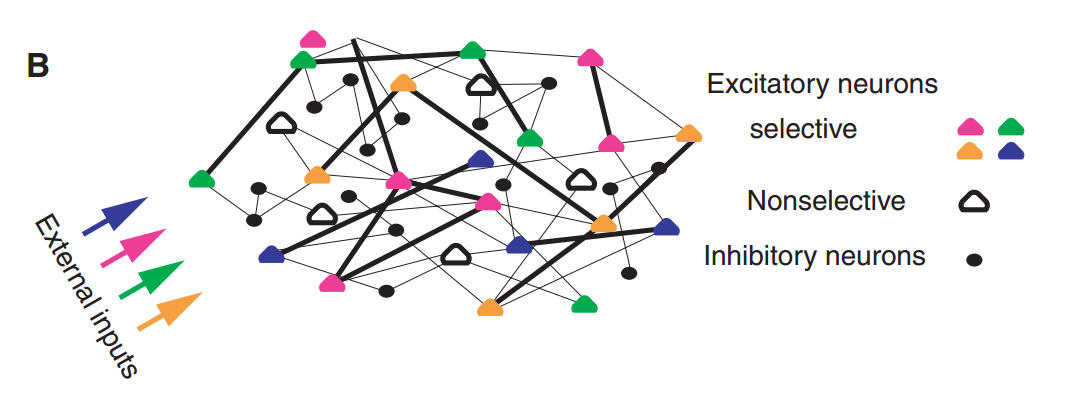
This is an addition to the reverberation theory about working memory. It adds that working memory is sustained by calcium-mediated synaptic facilitation in the recurrent connections of the neocortical networks. The paper is summarized nicely in the following excerpt from the introduction.
“Here, we present an alternative account based on properties of excitatory synaptic transmission in the prefrontal cortex (PFC). The PFC is a cortical area implicated in WM, and excitatory synaptic transmission in this area can be markedly facilitatory, unlike sensory areas where it is mostly depressing. We therefore propose that an item is maintained in the WM state by short-term synaptic facilitation mediated by increased residual calcium levels at the presynaptic terminals of the neurons that code for this item.”
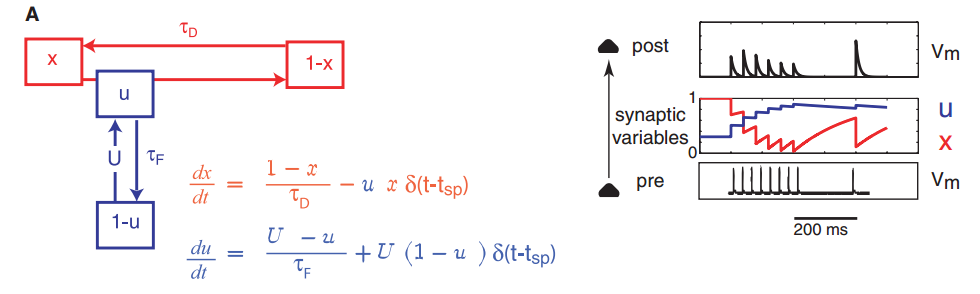
They used simple integrate-and-fire neurons with the usual resources approach to modeling plasticity in their simulation.
They define the “Reactivation” of memory as occurring when “almost every neuron in the population fires a spike within an interval of about 20 ms”. This is a pretty hand wavy metric for my tastes. I would prefer something a bit more concrete. Perhaps a description of which spatiotemporal pattern of activity represented the memory?
Thoughts
This is a very simple model.
Calcium isn’t explicitly modelled in their formulation.
What about a more detailed model considering the principles involved in sensitization?
Obviously, how does astrocytic involvement in the synaptic activity affect the memories?
This is essentially a simpler version of Izhikevich’s work, just asking different questions.
This is a review article published in TRENDS in Neurosciences by Xiao-Jing Wang in 2001.
The following two sentences from the abstract summarize the entire review nicely.
Stimulus-specific persistent neural activity is the neural process underlying active (working) memory. Since its discovery 30 years ago, mnemonic activity has been hypothesized to be sustained by synaptic reverberation in a recurrent circuit.
Introduction
“The obligatory physical process underlying active (working) memory is persistent neural activity that is sustained internally in the brain, rather than driven by inputs from the external world.”
I suppose I understand the message being portrayed here, but this sentence hints that there is some internal process that is “choosing” to drive the recurrent activity. The way I see it, external activity is driving, or initially drove, the internal process that is sustaining the recurrent activity. However indirectly, I believe it is external stimuli which drives the recurrent activity, otherwise we would have a rather catastrophic existential crisis on our hands!
How localized can it be?
Back in 2001 the idea was that these reciprocal networks were formed across many brain regions not in local regions. Or in other words, we might “see” or record consistent activity from a small region in the neocortex, but the recurrent activity is not contained in that small region. While the majority of activity is there, perhaps representing the memory, there are signals being sent across many brain regions. An interesting study would be to cut off connection between some of these hypothesized regions and explore the effect on the patient’s working memory. That being said here is an excerpt from the paper just after having explained the above
“Experiments and biophysical modeling on the neural basis of persistent activity have so far been focused on the scenario of reverberation within a brain area. The present article will be confined to synaptic mechanisms in a local recurrent network.”
Attractor paradigms
This part was nice. Since the 1970′s they’ve been considering ‘dynamical attractors’ as plausible explanations for the delay activity patterns observed. As of 2001 he said
It is only recently, beginning with the work by Amit and colleagues, that attractor network models have been implemented with realistic models of cortical neurons and synapses
This is great because I found more papers where actualy models and simulations were performed. Note to self: Check out Amit DJ‘s work.
NMDA receptors and the stability of a memory network
Apparently, the recurrent activity necessary to give rise to working memory behavior is “easier to realize” if the network’s synapses are primarily voltage-gated NMDA receptors. This is due to many things, such as the fact that AMPAR-mediated EPSCs are about three times faster than the GABA receptor-mediated IPSCs.
I was very happy to see a box containing outstanding questions at the end of the paper. I will paste them here for posterity.
Recent theoretical models have raised several neurophysiological questions that can be investigated experimentally. Answers to these questions will help to elucidate the mechanisms of neural persistent activity.
What is the minimum anatomical substrate of a reverberatory circuit
capable of persistent neural activity?
Is persistent activity primarily sustained by synaptic reverberation, or by
bistable dynamics of single neurons?
What is the NMDA:AMPA ratio at recurrent synapses of association
cortices, especially in the prefrontal cortex?
How does this ratio depend on the frequency of repetitive stimulation
and on neuromodulation?
What are the negative feedback mechanisms responsible for the rate
control in a working memory network?
Is delay period activity asynchronous between neurons, or does it display
partial network synchrony and coherent oscillations?
Is delay period activity more sensitive to NMDAR antagonists compared
with AMPAR antagonists?
Does persistent activity disappear in an abrupt fashion, with a graded
block of NMDAR and AMPAR channels, as predicted by the attractor
model?
How significant are drifts of persistent activity during working memory?
Are drifts random or systematic over trials?
What are the biological mechanisms underlying the robustness of a
memory network with a continuum of persistent activity patterns?
This is a Nature review article from 2010 written by Wei Deng, James Aimone and Fred Gage.
Timeline and processes involved in the development of a new hippocampal neuron
Freshly born neurons develop from neural progenitor cells in the subgranular zone of the hippocampus. Within the first week they differentiate into dentate granule cells and slowly migrate to the dentate gyrus. Within the second week they grow dendrites which extend to the CA3 region. These new neurons are still immature and upon receiving GABAergic input respond with slow rising and decay kinetics. Interestingly, administration of a GABA receptor agonist promotes dendrite growth of adult-born dentate granule cells, while a deprivation reduces the number of adult-born dentate granule cells surviving the second week after birth. During the third week after birth these dentate granule cells being to form connections with the surrounding neuronal network. By roughly day 16, synapses are formed. The development of both afferent and efferent synapses from newly generated dentate granule cells seems to involve targeting to pre-existing synaptic partners, which suggests a role for circuit activity in the integration of these new cells. Although the structural modification of dendritic spines and axonal boutons continues to occur as the adult-born dentate granule cells become older the basic physiological properties and synaptic plasticity at 8 weeks of age are indistinguishable from those of mature dentate granule cells. As discussed below, the unique physiological characteristics of adult-born dentate granule cells before 6 weeks of age enable these neurons to be discretely regulated by network activity and possibly to make distinct contributions to learning and memory.
New neurons and memory capacity: addition or replacement?
*for example, neurogenesis allows the network to avoid local minima, which are a problem with some learning rules* source 1source 2.
While learning more about the hippocampus, I came across Marzieh Ghiasi’s blog post where she compiled a great list of resources to help in studying the anatomy of the brain. Please visit her blog to check it out!
Daniel Kahneman talks about two distinct processes taking place in the brain. Thinking fast, and thinking slow. One process is internal, intrinsic, such as reflexes, visual processing etc. Another is slow and deliberate, memory recollection, mental math etc.
While reading his book, Thinking Fast and Slow, it dawned on me that in the brain we have two distinct networks that communicate with one another. A neural network which science has already established to be fast (milliseconds) and not apparently under voluntary control, and an astrocyte network which we now well know to be slow (seconds) and kludgy. We have yet to discover any underlying neural mechanics directly associated with things like slow conscious thought. Perhaps the slow astrocyte networks may have some answers. It receives input and stimuli from the fast neural network, and is then able to send signals back to it.
This requires more thought. Infact, the whole notion could likely be debunked with some carefully crafted thought experiments about cognitive properties we know to exist. Regardless it is an appealing notion. I leave it here for posterity.
TLDR
To recover many recently deleted files or folders scattered across many directories, just delete the folder highest in the file system tree that contains everything you want restored. Then recover that folder through the Dropbox web app. All of the recently deleted data within that folder will also be recovered.
The Situation
I have many workstations and need my files synced across them all. I’ve used many tricks in the past from rsync scripts, to mounted file systems. Dropbox’s syncing services allowed me to take my hands off of the syncing and put them back onto my research. However, there were some problems with how I used Dropbox. I partition my hard drive so I can have multiple OS on one machine for my different needs. Naturally, I want my files synced across each partition. Unfortunately I had partitioned my hard drive long before I installed Dropbox and overlooked a little detail…
The Problem
I always partition my hard drive into n+1 partitions where n is the number of operating systems I plan to use. The extra partition is where I store my common files that I want access to across all OS. Given that set up, I over looked the consequences of using different Dropbox apps to sync the same files and folders on the same partition. I used one OS far more than the others and between the lab, work, and home my syncing life was great. But, the one day I decided to use another OS turned into a very sad day. Since both instances of Dropbox were looking at the same file system, when the Dropbox from a different OS looked at the files and saw that they didn’t match what it had, it began deleting everything that wasn’t there when since I last ran it.
The Fix
After fretting for a while I realized the fix was quite easy. Dropbox provides a great caching and file recovery system. Just look in the folders via the Dropbox web app and you can click on recently deleted files and restore them. The problem for me was that by the time I realized my files were being deleted I had already lost thousands of them and they were scattered through out my folders (Dropbox apparently deletes randomly). The trick that saved me hours of time was noticing how Dropbox restored folders as opposed to files. When you restore a folder Dropbox doesn’t know which files were in it when it was deleted, so it just restores every file that has ever been in the folder (for the past 30 days I believe). So to recover my thousands of scattered files, I just deleted the entire folder from my local file browser and then restored it via the Dropbox web app. As expected, all of my recently deleted files were restored.
Sufficiently intelligent individuals know better than to get involved in politics. As a result we are left with the politicians we have today. Unfortunately, I must not be sufficiently intelligent. I have sought truth regarding the current plight between Palestine and Israel. Like my old friend Socrates, I too believe that constant questioning leads to truth.
The history behind their conflict can be presented succinctly as follows. In the 1500′s, the region of land in dispute was known as Palestine and was ruled by the Ottoman empire. Up until the beginning of WWI in 1914, there was no significant conflict between the Palestinians and the Jewish people [1]. To escape prosecution in Nazi Germany many Jewish people began to immigrate to Palestine. After the war, the British gained control over the land and the Jewish settlements were publicly supported with the Balfour Declaration in 1917 [2]. Up until WWII in 1947 there was a lot of pushing and shoving for power between the land’s two inhabitants. After the war, the United Nations broke the land into 2 states, Palestine and Israel [3]. Palestine opposed the resolution on the grounds that the land was originally theirs. In an effort to retake their land, Palestine rallied the support of its neighboring countries and the united forces of Egypt, Jordan, Syria, and Palestine invaded Israel in 1967. Israel defeated the united forces and during the war acquired the Palestinian land previously partitioned by the United Nations [4]. The conflict did not end at the cessation of the war. In 2007, Israel gave the land known as the Gaza strip to the Palestinians as a part of the unilateral disengagement plan [5]. So in summary, the conflict between Israelis and Palestinians began as a fight for land.
So for all practical purposes the Palestinian people were routed from their home. They made an effort to retake their land and were unsuccessful. So what is the current conflict based upon? Are they still fighting for their land? A quick search through Google regarding the current political affairs paints Israel to be the aggressors. There are many videos and links about the brutal killing and torture of Palestinian civilians by the Israelis. There is a full documentary about how the Isreali military is raiding homes and kidnapping Palestinian children for interrogation. The evidence seemed to be pretty clear. However, I found all of this to be a bit curious. For example, the Israeli military has roughly 4000 tanks and 450 aircrafts, the Palestinian forces have 0 tanks and 0 aircrafts [6]. Yet Israel ceded the Gaza strip to the Palestinians in 2007. If the Palestinians pose no threat to Israel why would they give them land? What would drive them to commit the heinous acts described in the many videos and articles on the internet? The claims just didn’t support the facts. So I began to dig deeper and what I found was a surprising insight into how technology has created a paradigm shift in modern warfare tactics.
I began by chasing down the sources of the aforementioned documentary regarding Israel’s detention centers and their treatment of non-Jewish children. Most of their facts and claims came from a UNICEF document published in 2013 [7]. The claims they made in the documentary matched what was written in the bulletin. The next step was to check the sources of the UNICEF bulletin. Turns out most of their information was obtained via word of mouth and came from a UNICEF office located in the Gaza strip, a.k.a modern day Palestine. In light of this finding, I chose to search for more credible, unbiased sources regarding the quality of life of children in Israel and Palestine. I came across two documentaries, which once contrasted, suggested the existence of an unsettling truth. The first is a documentary about the conflict in Jenin from the perspective of the Palestinians called Jenin Jenin, and the second is a documentary about the conflict in Jenin from the perspective of the Israelis called The Road to Jenin.
“Jenin Jenin” was an hour long documentary of Palestinians sharing personal testimonies about their hardships throughout the conflict. These were stories about Israeli soldiers shooting women and children, trampling elderly men with tanks, and molesting women. The first 15-20 minutes were moving, but after a while it seemed to be just a collection of emotional Palestinians telling stories about what happened. They did not present any testimonies from Israeli soldiers. War is awful. It has happened throughout all of history and no matter how it is carried out, people always suffer. While it is clear that the Palestinians have suffered, there was no evidence presented that even suggested the veracity of their claims. I felt as if I was being manipulated, as if I were being persuaded to sympathize with the Palestinians. To illustrate my point, below is a clip from the documentary where a young girl talks about her experiences. In my opinion children don’t talk like this. Perhaps I don’t know children very well, or maybe the translations are just not very good. Regardless you should watch the entire documentary and draw your own conclusions.
“The Road to Jenin”, while still being somewhat biased, at least provided interviews with people from both sides. In this documentary the Palestinians tell equally horrific stories of what went on. This time however, facts are presented demonstrating their exaggeration which supports my previous hunch. What really brought everything together for me was the interview with the Palestinian children. The things they said were appalling. There was so much hate in their voice, and you could see the determination in their eyes. The interview with the children is shown below.
For me, this was enough evidence to form some basic opinions on the matter. Firstly regarding the claims that Israel mistreats non-Jewish children. Whether they are true or not, once you put a gun in a child’s hands they are not longer a child, but a soldier. If I were in Israel’s situation where the Hamas (a terrorist organization occupying the Palestinian territory [8]) were using children as suicide bombers and undercover soldiers to kill my people and destroy my country, I would also treat the children like soldiers. Secondly, much of the information on the internet about how Israel continues to kill young Palestinian children, seems to leave out the part about how those children were first trying to kill the Israelis. This is similar to the documentary “Jenin Jenin” which seems aimed at building compassion in the heart of the viewers. With the previously mentioned military strengths in consideration, the Hamas leaders know they cannot win in combat. So it seems they are waging a different kind of war, an information war. If they can persuade enough of the world to sympathize with them, then Israel can not retaliate for fear of political backlash. A recent article by Daniel Pipes summarizes this situation excellently.
“No longer: The battlefield outcome of Arab–Israeli wars in last 40 years has been predictable; everyone knows Israeli forces will prevail. It’s more like cops and robbers than warfare. Ironically, this lopsidedness turns attention from winning and losing to morality and politics. Israel’s enemies provoke it to kill civilians, whose deaths bring them multiple benefits.”[9]
Inspired by Daniel’s article, I continued my research looking for more evidence to support the idea that the Hamas was spreading propaganda and waging an information war. I found an interview with Hamas leaders where they openly encourage Gaza citizens to “protect” the Hamas official’s buildings with their bodies. As a consequence the Israelis will be more reluctant to continue their attacks. It is tactics like this that lead to the death of Palestinian civilians and it is their deaths we continue to hear about in the media.
So in conclusion who is right and wrong? In the real world we must make decisions based on incomplete information. The point of this post is to share information that seems to be poorly represented in the media. Palestinians are certainly entitled to feel robbed by the Israelis for occupying what was once their land. However, the UN clearly resolved to divide the country into 2 states and it was the Palestinians who attacked Israel. Does the loss of their land 40 years ago warrant strapping bombs to children? According to western standards – not likely. However the conflict is not occurring in the West and we must keep that in mind when forming our opinions. What is most important is that people have access to as many sides of a story as possible when drawing their own conclusions.
“Country reports on terrorism 2005″, United States Department of State. Office of the Coordinator for Counterterrorism. U.S. Dept. of State Publication 11324. April 2006. p 196
Ben Goertzel, Founder of OpenCog, presents a high level summary of the Artificial General Intelligence (AGI) field in his 2014 review article [1]. Here I summarize the paper and then share my conclusions.
Summary
The paper can be broken into 5 primary sections.
First he presents the core concepts behind AGI.
He then attempts to unravel the complexities of understanding and defining general intelligence.
Next a careful consideration of projects in the field yield a succinct categorization of modern AGI methodologies. This is the meat of the paper and the pros/cons analysis for each categorization is particularly elucidating.
Then many robust graphs and systems modelling structures which underlay human-like general intelligence are presented.
Lastly a consideration of metrics and analysis methods is performed.
In less details, the AGI field encompasses all methodolgies, formalisms, and attempts at creating or understanding thinking machines with a general intelligence comparable to or greater than that of human beings. As can be seen from the previous sentence this is a difficult concept to delineate. In light of this, Goertzel presents many qualitative AGI features that roughly describe the purpose and direction of the field. These features are believed to be accepted by most AGI researchers. After some hand waving he presents what he calls, the Core AGI Hypothesis.
Core AGI Hypothesis:
The creation and study of synthetic intelligences with sufficiently broad (e.g. human-level) scope and strong generalization capability, is at bottom qualitatively different from the creation and study of synthetic intelligences with significantly narrower scope and weaker generalization capability.
Goertzel ensures his readers that this hypothesis is widely accepted by “nearly all researchers in the AGI community”. This contrasts what has come to be known as narrow AI, a term coined by Ray Kurzweil. Narrow AI is synthetic intelligence software designed to solve specific, narrowly constrained problems [2]. A key feature of AGI which needs to be elaborated is the notion of general intelligence. Many approaches to defining and explaining what it means to be “generally intelligent” are proposed. After considering Psychological and Mathematical characterizations, adaptation and embodiment approaches, and cognitive-architectures, Goertzel admits that no widely accepted definition exists. This, we will see, is a recurring theme amid the AGI community.
After the high level introduction to the scope of AGI a succinct categorization of the mainstream AGI approaches is presented. Goertzel partitions the field into 4 categories.
Symbolic
The roots of the symbolic approach to AGI reach back to the traditional AI field. The guiding principle for all symbolic systems is the belief that the mind exists mainly to manipulate symbols that represent aspects of the world or themselves. This belief is called the physical symbol system hypothesis.
FOR:
Symbolic thought is what most strongly distinguishes humans from other animals; it’s the crux of human general intelligence. Symbolic thought is precisely what lets us generalize most broadly. It’s possible to realize the symbolic core of human general intelligence independently of the specific neural processes that realize this core in the brain, and independently of the sensory and motor systems that serve as (very sophisticated) input and output conduits for human symbol-processing.
AGAINST:
While these symbolic AI architectures contain many valuable ideas and have yielded some interesting results, they seem to be incapable of giving rise to the emergent structures and dynamics required to yield humanlike general intelligence using feasible computational resources. Symbol manipulation emerged evolutionarily from simpler processes of perception and motivated action; and symbol manipulation in the human brain emerges from these same sorts of processes. Divorcing symbol manipulation from the underlying substrate of perception and motivated action doesn’t make sense, and will never yield generally intelligent agents, at best only useful problem-solving tools.
Emergentist
The Emergentist approach to AGI takes the view that higher level, more abstract symbolic processing, arises (or emerges) naturally from lower level “subsymbolic” dynamics. As an example, consider the classic multilayer neural network which is in most ubiquitous practice today. The view here is that a more thorough understanding of the fundamental components of the brain and their interplay may lead to a higher level understanding of general intelligence as a whole.
FOR:
The brain consists of a large set of simple elements, complexly self-organizing into dynamical structures in response to the body’s experience. So, the natural way to approach AGI is to follow a similar approach: a large set of simple elements capable of appropriately adaptive self-organization. When a cognitive faculty is achieved via emergence from subsymbolic dynamics, then it automatically has some flexibility and adaptiveness to it (quite different from the “brittleness” seen in many symbolic AI systems). The human brain is actually very similar to the brains of other mammals, which are mostly involved in processing high-dimensional sensory data and coordinating complex actions; this sort of processing, which constitutes the foundation of general intelligence, is most naturally achieved via subsymbolic means.
AGAINST:
The brain happens to achieve its general intelligence via self-organizing networks of neurons, but to focus on this underlying level is misdirected. What matters is the cognitive “software” of the mind, not the lower-level hardware or wetware that’s used to realize it. The brain has a complex architecture that evolution has honed specifically to support advanced symbolic reasoning and other aspects of human general intelligence; what matters for creating human-level (or greater) intelligence is having the right information processing architecture, not the underlying mechanics via which the architecture is implemented.
Computational Neuroscience
As it sounds, computational neuroscience is an approach to exploring the principles of neuroscience using computational models and simulations. This approach to AGI falls under the emergentist category. If a robust model of the human brain can be developed it stands to reason the we may be able to glean insight into what components of the model give rise to higher level general intelligence.
FOR:
The brain is the only example we have of a system with a high level of general intelligence. So, emulating the brain is obviously the most straightforward path to achieving AGI. Neuroscience is advancing rapidly, and so is computer hardware; so, putting the two together, there’s a fairly direct path toward AGI by implementing cutting-edge neuroscience models on massively powerful hardware. Once we understand how brain-based AGIs work, we will likely then gain the knowledge to build even better systems.
AGAINST:
Neuroscience is advancing rapidly but is still at a primitive stage; our knowledge about the brain is extremely incomplete, and we lack understanding of basic issues like how the brain learns or represents abstract knowledge. The brain’s cognitive mechanisms are well tuned to run efficiently on neural wetware, but current computer hardware has very different properties; given a certain fixed amount of digital computing hardware, one can create vastly more intelligent systems via crafting AGI algorithms appropriate to the hardware than via trying to force algorithms optimized for neural wetware onto a very different substrate.
Developmental Robotics
Infants are the ultimate scientists. They use all of their senses to interact with their environment and over time create a model of their perceived reality. It is argued that general intelligence arises from “the brain’s” constant interaction with its surroundings and environment. Developmental robotics attempts to recreate this process.
FOR:
Young human children learn, mostly, by unsupervised exploration of their environment – using body and mind together to adapt to the world, with progressively increasing sophistication. This is the only way that we know of, for a mind to move from ignorance and incapability to knowledge and capability.
AGAINST:
Robots, at this stage in the development of technology, are extremely crude compared to the human body, and thus don’t provide an adequate infrastructure for mind/body learning of the sort a young human child does. Due to the early stage of robotics technology, robotics projects inevitably become preoccupied with robotics particulars, and never seem to get to the stage of addressing complex cognitive issues. Furthermore, it’s unclear whether detailed sensorimotor grounding is actually necessary in order to create an AGI doing human level reasoning and learning.
Hybrid
In recent years AGI researchers have begun integrating both symbolic and emergentist approaches. The motivation is that, if designed correctly, each system’s strengths can ameliorate the other’s weaknesses. The concept of “cognitive synergy” captures this principle. It argues that higher level AGI emerges as a result of harmonious interactions from multiple components.
FOR:
The brain is a complex system with multiple different parts, architected according to different principles but all working closely together; so in that sense, the brain is a hybrid system. Different aspects of intelligence work best with different representational and learning mechanisms. If one designs the different parts of a hybrid system properly, one can get the different parts to work together synergetically, each contributing its strengths to help over come the others’ weaknesses. Biological systems tend to be messy, complex and integrative; searching for a single “algorithm of general intelligence” is an inappropriate attempt to project the aesthetics of physics or theoretical computer science into a qualitative different domain.
AGAINST:
Gluing together a bunch of inadequate systems isn’t going to make an adequate system. The brain uses a unified infrastructure (a neural network) for good reason; when you try to tie together qualitatively different components, you get a brittle system that can’t adapt that well, because the different components can’t work together with full flexibility. Hybrid systems are inelegant, and violate the “Occam’s Razor” heuristic.
Universalist
The univeralist approach leverages a principle employed by many creative designers and inventors. Instead of coming up with an idea that satisfies all of a problems inherent limitations, one “dreams big” and develops elaborate, even unrealistic ideas, and later simplifies them to fit within the confines of the proposed problem. In regard to AGI, the so called universalist approach, aims at developing ideal, perfect, or unrealistic models of general intelligence. These models and algorithms may require incredible power, even infinite power to be employed. In summary universalists might argue that one should not limit their creativity by any imposed constraints.
FOR:
The case of AGI with massive computational resources is an idealized case of AGI, similar to assumptions like the frictionless plane in physics, or the large population size in evolutionary biology. Now that we’ve solved the AGI problem in this simplified special case, we can use the understanding we’ve gained to address more realistic cases. This way of proceeding is mathematically and intellectually rigorous, unlike the more ad hoc approaches typically taken in the field. And we’ve already shown we can scale down our theoretical approaches to handle various specialized problems.
AGAINST:
The theoretical achievement of advanced general intelligence using infinitely or unrealistically much computational resources, is a mathematical game which is only minimally relevant to achieving AGI using realistic amounts of resources. In the real world, the simple “trick” of exhaustively searching program space until you find the best program for your purposes, won’t get you very far. Trying to “scale down” from this simple method to something realistic isn’t going to work well, because real-world general intelligence is based on various complex, overlapping architectural mechanisms that just aren’t relevant to the massive-computational-resources situation.
The next section attempts to address the issue of metrics. For any scientific field to be viable, the field must have a means to acquire quantifiable measurements that can be compared and contrasted. Goertzel covers a wide range of proposed approaches including quantifiable, qualitative analysis, and means to measure long term, and incremental term progress towards an ideal AGI. I will address this further in my conclusions.
Conclusions
This review paper was my first introduction to the AGI field. While at first I was a bit disappointed by the vagueness of the field’s direction and purpose, I came to see it as an opportunity to participate in an exciting new field – burgeoning, but adolescent. The whole of AGI is vast, and as of yet has no unified direction or purpose. Therefore acquiring a “forest level” view is difficult and would require studying many different “trees”. What I found most valuable in the paper was the succinct categorization of the fields approaches, giving the reader a decent view of the forest.
As a scientist from a mathematical background I find definitions and metrics to be very important. Goertzel did an excellent job illustrating how difficult it is to consolidate the field of AGI into a succinct definition. Researchers have varying opinions of what the field’s purpose is and what it is they’re working towards. It is only natural then that the field lacks any formalized metrics to measure progress. How can one measure progress if they don’t know what it is they’re working towards? While it is valid to criticize this lack of formalism, there are some who dismiss the field as a “wild goose chase”. Personally, I find this to be an overly harsh censure. Even AGI’s more developed sibling fields such as neuroscience lack the scientific capital to define what general intelligence is.
Recently, some governments have made neuroscience research a larger priority in their budgeting. As a consequence we can hope this increase in scientific vigor will bring us closer to understanding the brain, general intelligence, and as a result, ourselves.
Math and computer science can seem difficult, but if it seems difficult to you then it just hasn’t been presented in a way tailored to how you think!
Let me show you how fun and easy it can be. I have my B.S. with honors in mathematics, a Masters in computational mathematics, and I’m working on my PhD in scientific computing with a focus in computational neuroscience and learning. I’ve been tutoring for over 6 years and I have great reviews from my students.
After connecting to your newly instantiated server, you will want to configure it. The first thing I always do is create an account for myself, and then disable the public/private key authentication requirements for SSH tunneling. Be wary about whether you choose to do this as well, RSA authentication is a far superior security measure to username/password combinations. I however do not have any sensative information on my servers, I use many different computers and creating key/value pairs for all of them is a pain, and lastly my passwords are strong.
To create a new user you will need the adduser command.
sudo adduser username
After the above command, enter the relevant information and continue. To ensure that username has been added to the list of users you can examine the last line of the /etc/passwd file.
tail /etc/passwd
Next, you should add your new user to the super user group, sudo. The usermod command with the -a and -G flags will get the job done.
sudo usermod -a -G sudo username
Here -G says to add the user, username, to the group, sudo, and the -a flag ensures the group is appended to the list of groups the user currently belongs to. This ensures any previous groups are not over written.
Once I’ve got my new account made, I’d like to be able to log in to the server simply by specifying my username and password. The can be taken care of by changing the ssh daemon running on the server. Edit three lines in the /etc/ssh/sshd_config file…
RSAAuthentication yes –> RSAAuthentication no
PubkeyAuthentication yes –> PubkeyAuthentication no
PasswordAuthentication no –> PasswordAuthentication yes
Then you will just need to restart the ssh daemon.
sudo service ssh restart
Now you can log into your server with the usual approach…
ssh username@127.0.0.1
When you don’t yet have a domain name set aside for your server you will always need to reference it by its IP address. This is uncool. To make life easier I add an entry to the /etc/hosts file on my local machines.
127.0.0.1 superServer.net
Adding the above line to the /etc/hosts file will allow you to access your server located at 127.0.0.1 with the alias superServer.net via ssh, web browsers, and more. i.e.
ssh username@superServer.net
This makes things easier when setting up virtual hosts on the instance’s apache web server.
Lastly you want to get your ubuntu verion up to snuff with all the latest security patches and updates. Run a final update/upgrade to get that underway
sudo apt-get update && sudo apt-get upgrade
In most cases you’ll be doing development, coding, and networking. You are going to need to install some software from Ubuntu’s repository to get working. Below are a few packages that I recommend for general use.
We will be configuring a virtual server to provide data aggregation and visualization services. There will be many posts in this series, but we must begin by initializing our Amazon Web Services (AWS) instance. First choose to “Launch Instance” from the EC2 section of your AWS console.
Step 1: Choose AMI
We will be using the Ubuntu Server 12.04.3 LTS – ami-6aad335a (64-bit) Amazon Machine Image (AMI). Choose an appropriate image for your needs.
Step 2: Choose and Instance Type
As for the Instance Type, we will be launching a prototype for testing. If this is your first time using AWS, a micro instance should be available in the free tier. A micro instance will be sufficient for our testing needs.
Step 3: Configure Instance
The default settings should be sufficient for most needs. New AWS users may wish to check the “protect against accidental termination” box. Sometimes if one is unfamiliar with the AWS interface they may accidentally delete or terminate an instance. Checking this box requires the user to remove termination protection before this instance can be terminated.
Step 4: Add Storage
In most all cases web services will be accumulating, referencing, and manipulating, data. It is not wise to store this important data on the server itself for if the server crashes your data is lost as well. AWS provides a service called Elastic Block Storage designed to ameliorate this issue. In this step you can attach an arbitrarily sized storage space to your instance and later mount it wherever you need.
Step 5: Tag Instance
Tagging enables you to conveniently label your instance. This is most useful when you have many instances in different groups with different purposes. For your first instance a simple “Name” = “Webserver” key value pair should be sufficient.
Step 6: Configure Security Group
This is a very important step. The security group controls which ports should be open to the public. You can consider it a watered down iptable. Each case will have different needs, but in general you’ll want to have ports 22, 80, and 443 available. These will provide you with access to SSH (22), HTTP (80), and HTTPS (443).
Step 7: Review Instance Launch
Now just review your configurations and when you’re ready launch your new instance. At the launch of your new instance, you will be asked to use or create a security key-pair. You will need this to access your device, make sure you download it to a safe place.
Connecting to your new Instance
Now to connect to your new instance you’ll need to use an SSH client that can employ RSA key value authentication. Linux users can just use the ssh command with the -i flag to specify the local key downloaded in the previous step. Each instance will have a default root account that you must log into before you can create any users. For our instance it is ubuntu. Lastly you must get the public ip address of your instance. You can see what this is by clicking on the “instances” tab of the EC2 section within your AWS console. For example, if my key were located at “/path/to/key.pem”, I were using the ubuntu instance, and my new instance’s ip address was 127.0.0.1, I would connect to it with the following command.




 After connecting to your newly instantiated server, you will want to configure it. The first thing I always do is create an account for myself, and then disable the public/private key authentication requirements for SSH tunneling. Be wary about whether you choose to do this as well, RSA authentication is a far superior security measure to username/password combinations. I however do not have any sensative information on my servers, I use many different computers and creating key/value pairs for all of them is a pain, and lastly my passwords are strong.
